
HOW TO LOG INTO
YOUR PARIALS CRM
The Parials CRM is your personal command center for managing your marketing. From scheduling social media posts and sending email campaigns to organizing leads and automating follow-ups — everything lives inside one easy-to-use dashboard.
Logging in is the first step to unlocking all of these tools. Whether you're reviewing content, running a campaign, or following up with leads, this guide walks you through how to access your Parials CRM.
You can access the CRM any time by visiting app.parials.com.
Step 1: Go to app.parials.com
Open your preferred browser and visit app.parials.com. This is the secure login portal for your Parials CRM.

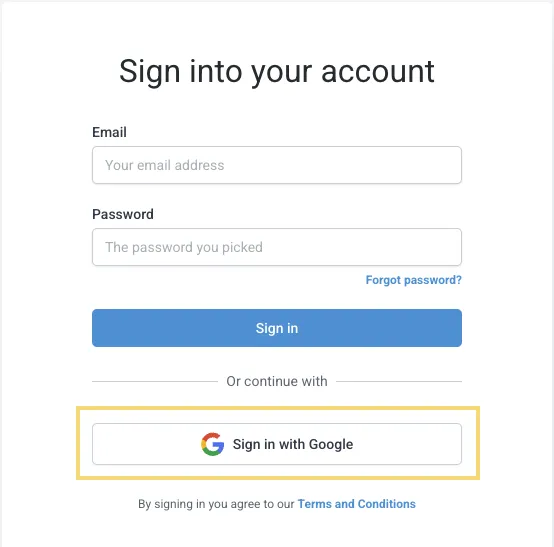
Step 2 – Option 1: Sign in with Google (Recommended)
Click the "Sign in with Google" button.
Choose your Google account and follow the prompts.
That’s it — you’re in! This method is fast and secure!
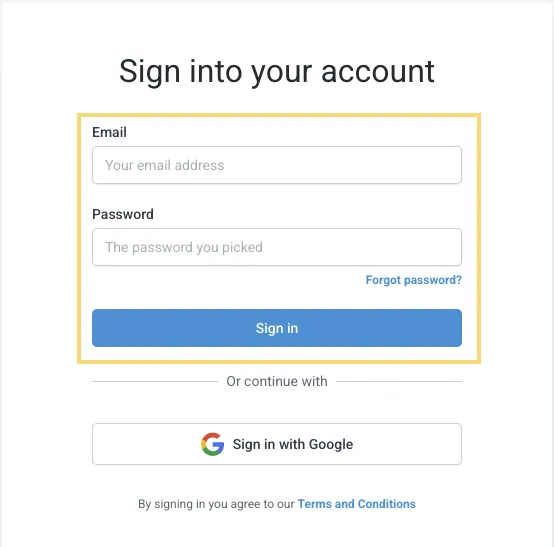
Step 3 – Option 2: Email & Password
Enter your registered email address.
Input your password.
Click “Sign In”.
Make sure you're using the email and password you signed up with. If you can’t remember, click “Forgot Password?” to reset it.
Step 5 – Explore Your Dashboard:
Once logged in, you’ll land on your personalized dashboard. From here, you can:
Schedule social media posts
Manage leads and messages
Book appointments
Launch campaigns and view performance reports
🧠 Tips for Easy Access
Bookmark https://app.parials.com in your browser.
If you run into login issues, email [email protected] and we will be happy to help get you logged in.
Looking to Do More With Your CRM?
Explore flexible design & marketing services that you can activate with our design points — no long-term contracts.
CUSTOMER CARE

FOLLOW US


Copyright 2025. Parials Digital Marketing, LLC. All Rights Reserved